main
ZSA Moonlander QMK Config
Custom QMK firmware for the ZSA Moonlander split keyboard (72 keys, STM32 MCU, RGB backlighting).
Features
- Layouts: Bépo (primary), ErgoL, QWERTY
- Home row mods (280ms tapping term), smart numword layer
- Combos, key overrides, leader key, tap dance
- French accents (US International layout), repeat key
Build & Flash
./go.sh build   # Build firmware (output: build/qmk_firmware/.build/)
./go.sh flash   # Build and flash (press reset button when prompted)
./go.sh update  # Update QMK submodules
./go.sh clean   # Clean build artifacts
Keymap Visualization
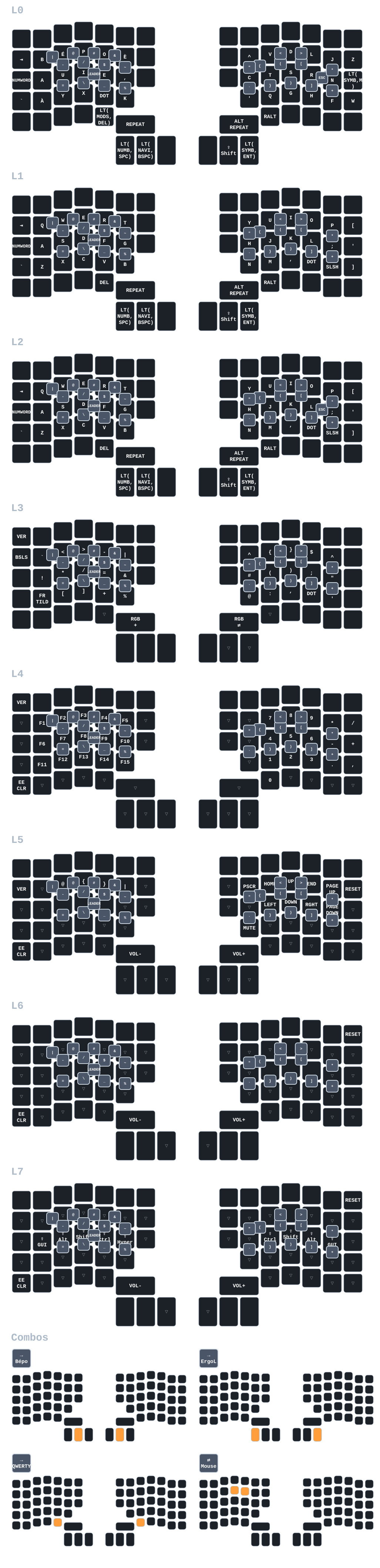
Note: Combo definitions are automatically parsed from keymap.c during visualization generation via parse-combos.sh.
Layers
| Layer | Name | Description |
|---|---|---|
| L0 | Bépo | Primary French layout, home row mods, numword activation |
| L1 | ErgoL | Alternative French layout |
| L2 | QWERTY | Standard layout with home row mods |
| L3 | Symbols | Programming symbols, brackets, operators |
| L4 | Numbers | Numpad layout (auto-disable after 5s) |
| L5 | Navigation | Arrows, page nav, media controls |
| L6 | Mouse | Mouse emulation |
| L7 | Modifiers | Additional modifiers and function keys |
Home row mods (Bépo): Left: A(GUI) U(Alt) I(Shift) E(Ctrl) ,(Hyper) | Right: C(Hyper) T(Ctrl) S(Shift) R(Alt) N(GUI)
Configuration
Timing
- Tapping: 280ms | Quick tap: 100ms | Flow: 150ms | Combo: 40ms | Numword timeout: 5s
Combos & Overrides
- Layer switching, Escape, special chars (|@#$/&-_=), brackets
- Bépo overrides: Shift+^=!, Shift+.=:, Shift+,=;, Shift+numbers, RAlt+B=|, RAlt+Space=_
French Accents (US International)
é è ê à â ù û î ô ë ï ç € (uppercase variants supported)
QMK Features
Enabled: Combos, key overrides, leader key, repeat key, tap dance, layer lock Disabled: Audio, caps word, auto shift, console, most RGB effects (size optimization)
Usage
- Layout switching: Bépo (Nav+Shift), ErgoL (Q+P), QWERTY (Numb+Symb), or via leader sequences
- Numword: Hold Space on Bépo layer (auto-disable after 5s)
- Leader key: Combo Del+RAlt (right thumb cluster, 300ms timeout per key)
- Mouse toggle: Combo Q+R
Leader Key Sequences
The leader key is activated by pressing Del+RAlt simultaneously (right thumb cluster). After activation, you have 300ms to press each subsequent key in the sequence.
Layout Switching (Leader + L + key)
| Sequence | Action |
|---|---|
| l b | Switch to Bépo |
| l e | Switch to ErgoL |
| l q | Switch to QWERTY |
Development Patterns - General (Leader + C + key)
| Sequence | Output | Notes |
|---|---|---|
| c n | nil | Go/common nil keyword |
| c e | if err != nil { |
Go error handling pattern |
| c l | console.log() | Cursor positioned inside () |
| c p | fmt.Println() | Cursor positioned inside () |
| c f | function() {} | Cursor positioned inside {} |
| c a | () => {} | Arrow function, cursor inside {} |
Development Patterns - Python (Leader + P + key)
| Sequence | Output | Notes |
|---|---|---|
| p i | if name == “main”: | Python main block |
| p d | def (): | Function definition, cursor at name |
| p c | class : | Class definition, cursor at name |
| p p | print(f"") | f-string print, cursor inside quotes |
| p t | try:…except Exception as e: | Try-except block |
| p w | with open("", “r”) as f: | File context manager, cursor at path |
Development Patterns - Emacs Lisp (Leader + E + key)
| Sequence | Output | Notes |
|---|---|---|
| e d | (defun () | Function definition, cursor at name |
| e i | (interactive) | Interactive declaration |
| e l | (let (( | Let binding |
| e s | (setq ) | Set variable, cursor at name |
| e m | (message “”) | Message output, cursor inside quotes |
| e r | (require ‘) | Require package, cursor after quote |
Development Patterns - Nix (Leader + N + key)
| Sequence | Output | Notes |
|---|---|---|
| n f | { pkgs, … }: | Nix function signature |
| n l | let…in | Let expression, cursor in body |
| n w | with pkgs; […] | With statement, cursor in list |
| n i | inherit ; | Inherit, cursor before semicolon |
| n b | buildInputs = [ ]; | buildInputs, cursor in list |
| n p | pkgs.writeShellScriptBin "" | Shell script, cursor at name |
Import Patterns (Leader + I + key)
| Sequence | Output | Notes |
|---|---|---|
| i p | import | Python simple import |
| i f | from import | Python from import, cursor at module |
| i n | { pkgs }: {…} | Nix module definition |
| i e | (use-package | Emacs use-package declaration |
Personal Macros (Leader + M + key)
| Sequence | Output | Notes |
|---|---|---|
| m e | vincent@sbr.pm | Email address |
| m g | Vincent Demeester vincent@sbr.pm | Git signature format |
| m s | – |
Email signature |
| m t | <Ctrl+U> | Timestamp placeholder |
Application Shortcuts (Leader + A + key)
| Sequence | Keybind | Action |
|---|---|---|
| a d | Mod+D | Launch fuzzel app launcher |
| a e | Mod+Shift+Enter | Launch Emacs client |
| a t | Mod+Enter | Launch Terminal (kitty) |
| a j | Mod+Control+D | Emoji picker (rofimoji) |
| a v | Mod+Control+V | Clipboard history (cliphist) |
| a r | Mod+Shift+D | Raffi launcher |
Note: These shortcuts match your niri window manager configuration.
Development
Files: config/{config.h, keymap.c, layermodes.{c,h}, rules.mk}, go.sh