Eyelash Corne ZMK Config
Custom ZMK firmware for the Eyelash Corne keyboard (42-key split, nice!nano v2, wireless Bluetooth).
Features
- Layouts: Bépo (primary), ErgoL, QWERTY
- Home row mods, smart numword layer, combos, mod-morph, leader keys
- Mouse emulation, French/currency Unicode support
- nice!view display (gem animation), RGB underglow (auto-off on idle)
- Power: 12min sleep timeout, +8dBm BT transmission
Build & Flash
./go.sh build  # Build both sides (output: firmwares/)
./go.sh flash  # Build and flash left/right (bootloader mode prompts)
Supports auto-mount (/run/media/$USER/NICENANO) and manual mount (/mnt).
Keymap Visualization
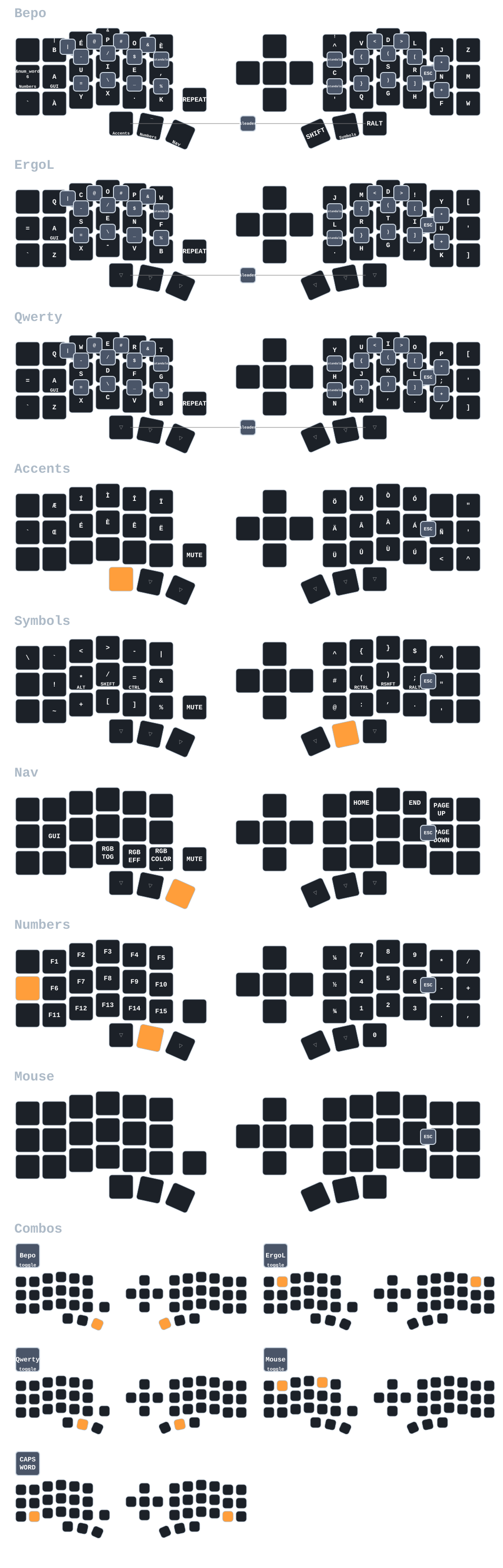
Layers
| Layer |
Name |
Description |
| L0 |
Bépo |
Primary French layout, home row mods, Unicode accents |
| L1 |
ErgoL |
Alternative French layout |
| L2 |
QWERTY |
Standard layout |
| L3 |
Accents |
French vowels (´ ` ^ ¨), Æ Œ Ñ Ç |
| L4 |
Symbols |
Programming symbols, brackets, operators |
| L5 |
Numbers |
Calculator-style numpad |
| L6 |
Navigation |
Arrows, page nav, shortcuts |
| L7 |
Function |
F1-F12, media, system controls |
Home row mods (Bépo): Left: A(GUI) U(Alt) I(Shift) E(Ctrl) | Right: C(Hyper) T(Ctrl) S(Shift) R(Alt) N(GUI)
Configuration
- Power: 12min sleep timeout, RGB auto-off, soft off support
- Bluetooth: +8dBm transmission, multiple devices
- Display: nice!view gem animation (4.8s interval), shows layer/battery/BT
- Mouse: Movement 1200, scroll 20, idle 125ms
Build config (build.yaml): Left/right halves with nice!view, settings reset
Leader Key Sequences
Leader key is activated with the RH0+RH2 combo (right thumb cluster: Shift + Alt on QWERTY). After activation, press a sequence of keys (timeout: 300ms per key) to insert text snippets or launch applications.
Layout Switching
| Sequence |
Output |
Description |
| l b |
Switch to BÉP |
Switch to Bépo layout |
| l e |
Switch to ERG |
Switch to ErgoL layout |
| l q |
Switch to QWE |
Switch to QWERTY layout |
Development Patterns - General
| Sequence |
Output |
Description |
| c n |
nil |
Go nil value |
| c e |
if err != nil {↵⇥ |
Go error check |
| c l |
console.log() |
JavaScript console.log |
| c p |
fmt.Println() |
Go fmt.Println |
| c f |
function() {} |
JavaScript function |
| c a |
() => {} |
JavaScript arrow function |
Development Patterns - Python
| Sequence |
Output |
Description |
| p i |
if name == “main":↵⇥ |
Python main block |
| p d |
def ():↵⇥ |
Python function def |
| p c |
class :↵⇥ |
Python class def |
| p p |
print(f”") |
Python f-string print |
| p t |
try:↵⇥↵except Exception as e:↵⇥ |
Python try/except |
| p w |
with open("", “r”) as f:↵⇥ |
Python with open |
Development Patterns - Emacs Lisp
| Sequence |
Output |
Description |
| e d |
(defun ()↵ |
Emacs Lisp defun |
| e i |
(interactive) |
Emacs Lisp interactive |
| e l |
(let (( |
Emacs Lisp let binding |
| e s |
(setq ) |
Emacs Lisp setq |
| e m |
(message “”) |
Emacs Lisp message |
| e r |
(require ‘) |
Emacs Lisp require |
Development Patterns - Nix
| Sequence |
Output |
Description |
| n f |
{ pkgs, … }: |
Nix function signature |
| n l |
let↵⇥↵in↵ |
Nix let/in expression |
| n w |
with pkgs; [↵⇥↵] |
Nix with statement |
| n i |
inherit ; |
Nix inherit keyword |
| n b |
buildInputs = [ ]; |
Nix buildInputs attribute |
| n p |
pkgs.writeShellScriptBin "" ‘’↵⇥↵’’ |
Nix shell script wrapper |
Import Patterns
| Sequence |
Output |
Description |
| i p |
import |
Python import |
| i f |
from import |
Python from import |
| i n |
{ pkgs }: {↵⇥↵} |
Nix module import |
| i e |
(use-package ↵⇥ |
Emacs use-package |
Personal Macros
| Sequence |
Output |
Description |
| m e |
vincent@sbr.pm |
Email address |
| m g |
Vincent Demeester vincent@sbr.pm |
Git signature |
| m s |
–↵Vincent Demeester↵vincent@sbr.pm |
Email signature |
Application Shortcuts
These leader sequences trigger niri window manager keybindings:
| Sequence |
Keybinding |
Application |
| a d |
Mod+D |
Fuzzel (app launcher) |
| a e |
Mod+Shift+Enter |
Emacs (client) |
| a t |
Mod+Enter |
Kitty (terminal) |
| a j |
Mod+Control+D |
Rofimoji (emoji) |
| a v |
Mod+Control+V |
Cliphist (clipboard) |
| a r |
Mod+Shift+D |
Raffi (launcher) |
Inspirations and References